Article by Marcus Siu
Last month, I wrote about Kanopy, the award-winning video streaming service provided to library patrons, who are able to stream for free just by having a library card that offers Kanopy as part of their services.
This month, its all about the “hoopla”.
Launched in 2010, hoopla is the digital service of Midwest Tape, a leading provider of entertainment media products and services: DVDs, CDs, audiobooks and shelf-ready solutions, to public libraries across North America for over a quarter of a century. Their purpose has always been to partner with libraries in delivering content to patrons in the most streamlined manner possible. Through the years, they’ve cultivated a growing passion for the evolving public library.
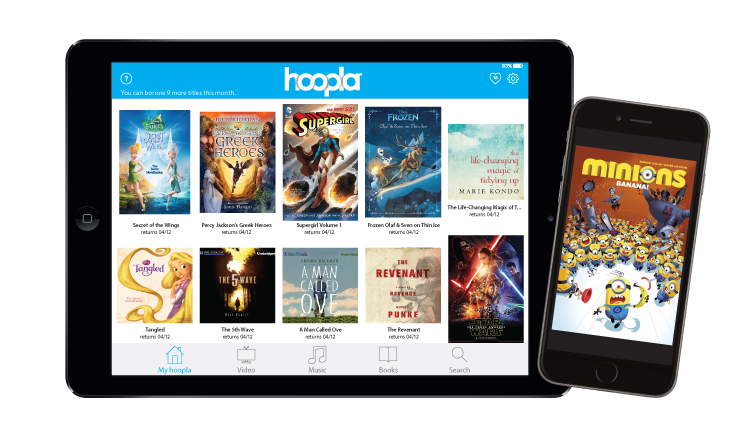
Hoopla, just like Kanopy, is a web and mobile (Android/iOS) library media streaming platform and library funded service, completely free to their patrons. Patrons of a hoopla sponsored library have access to its collection of digital media.

What distinguishes hoopla compared to Kanopy is that it lets you have access to not just movies and TV, but also for audio books, comics, e-books, and music. Considering how much audio books costs these days, it’s a great alternative than having to spend a lot of money and then leaving it on the shelf to possibly never listen to it again.
Hoopla pioneered a unique model that allows patrons to borrow content immediately, removing artificial availability constraints and maximizing the power of digital content and Internet distribution. Technologically, Hoopla focuses on the latest browser, phone, tablet, and TV products to deliver the best possible experience to the user, the public library patron.
For example, there is no waiting period for having to check out material. When you are at a public library looking for physical media, it may already be checked out already and you would have to put a reserve on it and wait several days or weeks for it. With Hoopla, since it’s digital media, you can check it out immediately with a click on your device.
Hoopla claims to have over 500,000 content titles across six formats. As of November 2016, Hoopla’s content comprised 35% audiobooks (for which Hoopla has contracts with publishers such as Blackstone Audio, HarperCollins, Simon & Schuster Audio, Tantor Audio, and others), followed by 22% movies (for which Hoopla has motion picture contracts with publishers such as Disney, Lionsgate, Starz, Warner Bros., and others), 19% music, 12% ebooks, 6% comics, and 6% television.
You can borrow and enjoy audiobooks, eBooks, comics, movies, TV, magazines, or music everywhere you have a screen-your computer, your phone, your car, even your TV. All you need is a library card. hoopla syncs across all your devices, so you can stream titles immediately or whenever you’re in the mood. Most titles can also be downloaded to your phone or tablet. hoopla offers more content, in more places, than any other digital library platform and it’s all FREE thanks to your public library! Titles may vary based on library catalog.
This is all you need:
- Tablet, smartphone, computer, or TV with streaming capabilities
- Email address and password
- Library card number (only needed one time in the registration process)
- Hoopla Digital app or updated browser software (e.g. Chrome, Firefox, IE, Safari, etc.)
Step 1: Register for a free Hoopla Digital account.
Go to hoopladigital.com and click on the blue Get Started button. (You may also use the free Hoopla Digital app to register. The registration process is similar.)
Step 2: Enter your information.
Enter your email address and create a new password. Review Hoopla Digital’s terms and conditions and click on the Agree button. Once your account is verified, you will need this email address and password to sign into Hoopla Digital.
Step 3: Choose your associated library.
Your associated Library may appear in the list of nearby libraries. If your public Library doesn’t appear in the list, type it in the search box.
Click on the Next button to continue registering.
Step 4: Enter your library card number.
Type your library card number – without spaces – in the box. Click on the Sign Me Up button.
NOTE: If your library card number ever changes, you will need to update your Hoopla Digital account at Settings > Library > Library Card Number.
Step 5: Start using Hoopla Digital.
You’re done! You will now be automatically signed into Hoopla Digital. If you need to sign into Hoopla Digital in the future, use the email address and password that you registered in Step 2.
Using Hoopla Digital
If you are a first time user, download the free Hoopla Digital app from your device’s app store. The most commonly devices are listed below. If you are using your laptop or desktop computer, all you need is a current web browser and the Widevine plug-in (see What is Widevine?).
Borrowing Titles
How does it work?
Library cardholders are allowed to check out 30 electronic items (e.g., eAudiobooks, eBooks, eMusic, eVideos) per month. There are no late fees. Once your item has expired, it will no longer play on your device. Check out periods are as follows:
- eAudiobooks – 21 days
- eBooks – 21 days
- eMusic Titles – 7 days
- eVideos (Movies and TV Shows) – 72 hours
How do I borrow a title?
Click on a title you like and then click the blue “Borrow” button.
Can I place a hold on items?
There is no need for holds with Hoopla Digital. Every title in its collection is available for check out 24/7. This means that if 200 library users want to check out a particular title, all 200 users can check it out without waiting.
Are titles downloaded onto my device or computer?
Titles can only be downloaded to mobile devices via the Hoopla Digital app. Downloading to desktop computers and laptops is not permitted, due to studio or publisher restrictions.
Can I renew a title?
Yes. The option to renew appears two days before the end of the borrowing period (21 days for eBooks, audiobooks, and comics, 72 hours for movies and television, and 7 days for music). A button will appear on the title screen with the option to renew the title. At this time, you can only use the renewal feature at hoopladigital.com. Please note that a renewal is the same as a new borrow, so a renewed title will count against your monthly limit (30 per month).

 mlsentertainment